



File Uploader
If you have wanted a self-contained PHP script for file uploading on your website, here it is.
Optionally, it can be customized to require login.
Tell the script which directory to use for storing uploaded files. Upload the script to your website. You're good to go.
Uploaded files will not overwrite each other. If a file is uploaded with the name of a file already in the directory, the new file gets a number appended to its file name.
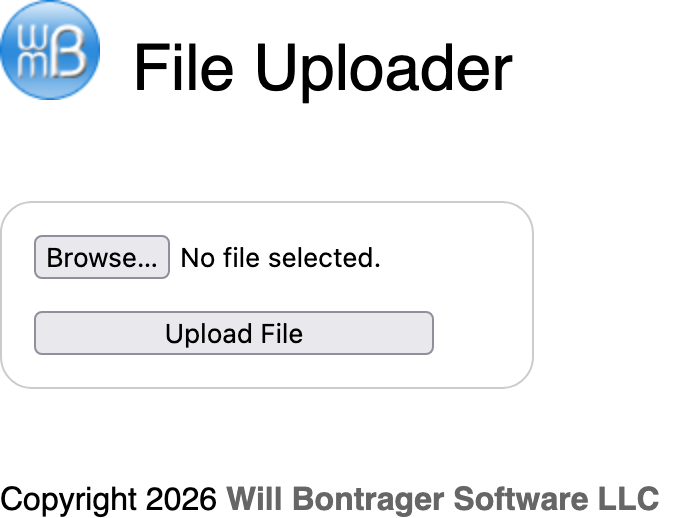
Here is a screenshot of what the control panel looks like.
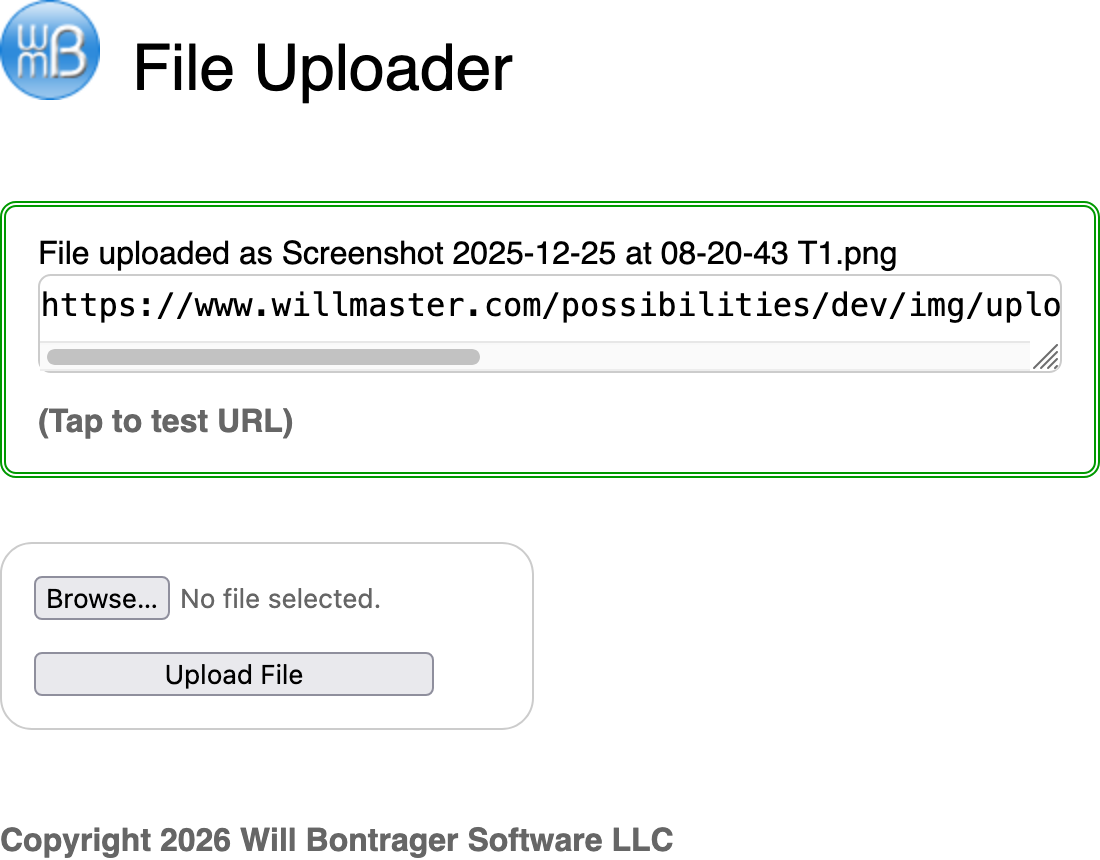
When a file is uploaded, the control panel also displays the URL to the file's stored name (remember, the software will append a number to the file name instead of overwriting a file). The control panel will also have a link so you can test it right there.
This screenshot shows what the control panel looks like after a file has been uploaded.
That's the simplicity of it.
Here is the source code.
<?php
/*
File Uploader
Version 2.0
March 9, 2026
Will Bontrager Software LLC
https://www.willmaster.com/
*/

/* Customizations */
//
// All values except $Cookielifetime are specifed between quotation marks.
//
// A.
// The directory relative to document root to put uploaded files:

$UploadedFilesDirectory = "/img/uploaded";

//
// B.
// Uername, password, cookie hame, and cookie lifetime to use this software.
// Leave one or more blank to disable login.

$Username = "t"; // Case-insensitive
$Password = "t"; // Case-sensitive
$Cookiename = "myCookie"; // Start with a letter; compose of letters, numbers, and/or underscore characters.
$Cookielifetime = 72; // # of hours (72 = 3 days)

//
// End of Customizations

if(isset($_POST['u']) and isset($_POST['p']))
{
   $_POST['u'] = strtolower(trim($_POST['u']));
   $_POST['p'] = trim($_POST['p']);
   $Username = strtolower(trim($Username));
   $Password = trim($Password);
   if($Password==$_POST['p'] and $Username==$_POST['u'])
   {
      $t = time();
      setcookie(trim($Cookiename),$t,($t+(60*60*$Cookielifetime)),'/','',true,true);
      $_COOKIE[$Cookiename] = $t;
   }
}
if($Username and $Password and $Cookiename and $Cookielifetime)
{
   $RequireLogin = (isset($_COOKIE[$Cookiename]) and $_COOKIE[$Cookiename]>999999999) ? false : true;
}
else { $RequireLogin = false; }
if(empty($UploadedFilesDirectory)) { $dir = '/'; }
else { $dir = preg_replace('/^'.preg_quote($_SERVER['DOCUMENT_ROOT'],'/').'/','',$UploadedFilesDirectory); }
$protocol = isset($_SERVER['HTTPS']) ? 'https' : 'http';
$imgURL = "$protocol://{$_SERVER['HTTP_HOST']}$dir";
$F = array('fname'=>'', 'URL'=>'');
$keepgoing = false;
$S = '';
if( isset($_FILES['uploadedFile']) )
{
   $keepgoing = true;
   if($_FILES['uploadedFile']['error']) { $S = getUploadErrorMessage($_FILES['uploadedFile']['error']); }
   if( (!$S) and $_FILES['uploadedFile']['size']<1) { $S = 'An empty file arrived.'; }
   if($S) { $keepgoing=false; }
}
if($keepgoing)
{
   $dir = "{$_SERVER['DOCUMENT_ROOT']}$dir";
   $dir = preg_replace('!/*$!','',$dir);
   if(!file_exists($dir)){mkdir($dir,0777,true);}
   $fname = $_FILES['uploadedFile']['name'];
   $ta = explode('.',$fname);
   $ext = array_pop($ta);
   $fname = implode('.',$ta);
   $number = 0;
   $fnameholder = $fname;
   while(file_exists("$dir/$fname.$ext"))
   {
      $number++;
      $numpadded = str_pad(strval($number),3,'0',STR_PAD_LEFT);
      $fname = "$fnameholder$numpadded";
   }
   $F['fname'] = "$fname.$ext";
   $F['URL'] = "$imgURL/{$F['fname']}";
   move_uploaded_file($_FILES['uploadedFile']['tmp_name'],"$dir/{$F['fname']}");
} // if($keepgoing)
function getUploadErrorMessage($num)
{
   $messageAppend = '';
   switch($num)
   {
      case UPLOAD_ERR_OK         : /* 0 */ return "There is no error, the file uploaded with success.$messageAppend"; /* 0, Introduced in PHP 4.2.0. */
      case UPLOAD_ERR_INI_SIZE   : /* 1 */ return "The uploaded file exceeds the upload_max_filesize directive in php.ini.$messageAppend"; /* 1, Introduced in PHP 4.2.0. */
      case UPLOAD_ERR_FORM_SIZE  : /* 2 */ return "The uploaded file exceeds the MAX_FILE_SIZE directive that was specified in the HTML form.$messageAppend"; /* 2, Introduced in PHP 4.2.0. */
      case UPLOAD_ERR_PARTIAL    : /* 3 */ return "The uploaded file was only partially uploaded.$messageAppend"; /* 3, Introduced in PHP 4.2.0. */
      case UPLOAD_ERR_NO_FILE    : /* 4 */ return "No file was uploaded."; /* 4, Introduced in PHP 4.2.0. */
      case UPLOAD_ERR_NO_TMP_DIR : /* 6 */ return "Missing a temporary folder.$messageAppend"; /* 6, Introduced in PHP 4.2.0. */
      case UPLOAD_ERR_CANT_WRITE : /* 7 */ return "Failed to write file to disk.$messageAppend"; /* 7, Introduced in PHP 4.3.10 and PHP 5.0.3. */
      case UPLOAD_ERR_EXTENSION  : /* 8 */ return "A PHP extension stopped the file upload. PHP does not provide a way to ascertain which extension caused the file upload to stop; examining the list of loaded extensions with phpinfo() may help."; /* 8, Introduced in PHP 5.2.0. */
   }
   return '';
} // function getUploadErrorMessage()
?><!doctype html>
<html>
<head>
<meta http-equiv="Content-Type" content="text/html;charset=utf-8">
<meta name="viewport" content="width=device-width, initial-scale=1.0">
<meta http-equiv="expires" content="Tue, 01 Jan 1980 11:00:00 GMT">
<style type="text/css">
@charset "utf-8";
* { box-sizing:border-box; } /* box-sizing:content-box; */
html { font-family:sans-serif; font-size:100%; }
a { font-weight:bold; text-decoration:none; color:#666666; }
input[type="text"], input[type="password"], textarea, input[type="submit"] { width:100%; }
input[type="text"], input[type="password"], textarea { font-size:1rem; border:1px solid #ccc; padding:.3rem; border-radius:.4rem; }
img, img a, a img { border:none; outline:none; text-decoration:none; max-width:100%; }
div > :first-child, ul > :first-child, ol > :first-child, p > :first-child { margin-top:0; }
div > :last-child, ul > :last-child, ol > :last-child, p > :last-child { margin-bottom:0; }
</style>
<title>File Uploader</title>
</head>
<body>
<div style="max-width:550px; position:relative;">
<img src="https://www.willmaster.com/images/wmlogo_icon.gif" style="float:left; padding-right:1em;" alt="Willmaster.com logo">
<div style="font-size:2rem; padding-top:20px;">File Uploader</div>
<div style="margin-bottom:.5in; clear:left;"></div>

<?php if($RequireLogin): ?>
<?php $F = array(); ?>
<form enctype="multipart/form-data" action="<?php echo($_SERVER['PHP_SELF']) ?>" method="post" accept-charset="utf-8">
<div style="width:fit-content; border:1px solid #ccc; border-radius:1em; padding:1em;">
<p>
Username:<br>
<input type="text" name="u">
</p>
<p>
Password:<br>
<input type="password" name="p">
</p>
<p>
<input type="submit" value="Log In" Xstyle="max-width:200px;">
</p>
</div>
</form>
<?php exit; ?>
<?php endif; ?>

<?php if($S): ?>
<div style="border:3px double #cc0000; border-radius:.5rem; padding:1rem; margin:2em;">
<?php echo($S) ?>
</div>
<?php endif; ?>

<?php if($F['URL']): ?>
<div style="border:3px double #009900; border-radius:.5rem; padding:1rem; margin:2em 0;">
<div>File uploaded as <?php echo($F['fname']) ?></div>
<textarea type="text" onclick="select()" nowrap; style="white-space:nowrap;"><?php echo(str_replace(' ','%20',$F['URL'])); ?></textarea>
<div style="margin-top:1rem;"><a href="<?php echo(str_replace(' ','%20',$F['URL'])); ?>" target="_blank">(Tap to test URL)<a></div>
<?php echo($S) ?>
</div>
<?php endif; ?>

<form enctype="multipart/form-data" action="<?php echo($_SERVER['PHP_SELF']) ?>" method="post" accept-charset="utf-8">
<div style="width:fit-content; border:1px solid #ccc; border-radius:1em; padding:1em;">
<p>
<input type="file" name="uploadedFile">
</p>
<p>
<input type="submit" value="Upload File" style="max-width:200px;">
</p>
</div>
</form>

<div style="height:2em;"></div>
<p>Copyright 2026 <a href="https://www.willmaster.com/" target="_blank">Will Bontrager Software LLC</a></p>
</div>
</body>
</html>
Customizations:
There are two places to customize. One is for where to put the uploaded image file, and the other is information for the optional login functionality.
$UploadedFilesDirectory
Specify the directory where to put the uploaded image files. It should be a directory relative to the document root (the directory where your website's home or index page is).
$Username

$Password

$Cookiename

$Cookielifetime
When you want to specify a log-in for the uploading software, then provide information for those 4 values. If any one of those values is blank, no login will be required for uploading files.
The script has notes about what is expected for the values.
When the customizations have been done, upload the script and make a note of its URL. Use it by typing its URL into your browser's address bar.
This is fine PHP file uploading software. It may be the simplest stand-alone file uploader existing that also allows an optional log-in.
(This content first appeared in Possibilities newsletter.)
Will Bontrager







