



Random Characters Function
Often I have use for random characters in my PHP scripts. I've tweaked my go-to function from time to time over the years. The latest version comes with this article.
A random character or a series of random characters may be needed for a filename, a password, a security implementation (to make something virtually unguessable, for example), or any of several other reasons.
Here is the function.
function AppendRandomCharacter($s='',$howmany=1,$chars='abcdefghijklmnopqrstuvwxyzABCDEFGHIJKLMNOPQRSTUVWXYZ0123456789')
{
   if(!strlen($chars)) { $chars='-'; }
   $endchar = strlen($chars)-1;
   for($i=0; $i<$howmany; $i++) { $s .= substr($chars,mt_rand(0,$endchar),1); }
   return $s;
} # function AppendRandomCharacter()
To use the AppendRandomCharacter() function, paste it into your PHP code. Then call the function with zero or up to three values.
The code below calls AppendRandomCharacter(), which returns 1 random character. The character is then printed to your browser:
$string = AppendRandomCharacter();
echo($string);
You can specify up to three values when you call the AppendRandomCharacter() function. Here are examples.
// To obtain 20 random characters.
$string = AppendRandomCharacter("",20);
echo($string);

// To obtain 20 random numbers
$string = AppendRandomCharacter("",20,"0123456789");
echo($string);

// To append 1 random character to the $string variable.
$string = "test"
$string = AppendRandomCharacter($string);
echo($string);

// To append 20 random characters to the $string variable.
$string = "test"
$string = AppendRandomCharacter($string,20);
echo($string);

// To append 20 random numbers to the $string variable.
$string = "test"
$string = AppendRandomCharacter($string,20,"0123456789");
echo($string);
The demonstration script (available further below) can be used to become familiar with other ways to use the function.
Here is a description of the three values that may be used with the AppendRandomCharacter() function.
-
A string, which may be blank. (Blank is also the default.) AppendRandomCharacter() appends random characters to a string and returns the result. If the string is blank, then only the random character is returned.
As an example, if the string is "Will" and the random character is "Y", then the function would return "WillY". If the string is blank, the function would return "Y".
-
A number, which should be more than zero. (The number 1 is the default.) The specified number (or the default) tells the function how many random characters to return.
-
A string of one or more characters from which random characters are selected. (The default is s 62 characters composed of 26 lower-case letters, 26 upper-case letters, and 10 digits.) If you specify a string and the string is empty, the function will assume the ("-") hyphen character for random selection.
The function will make a fresh selection from the string for every character it needs; thus, you may find duplicate selections. If the string has only one character, that character will be selected as the random character every time.
I'll provide the source code of a demonstration script in a moment. First, here is a screenshot of what the demonstration script prints.
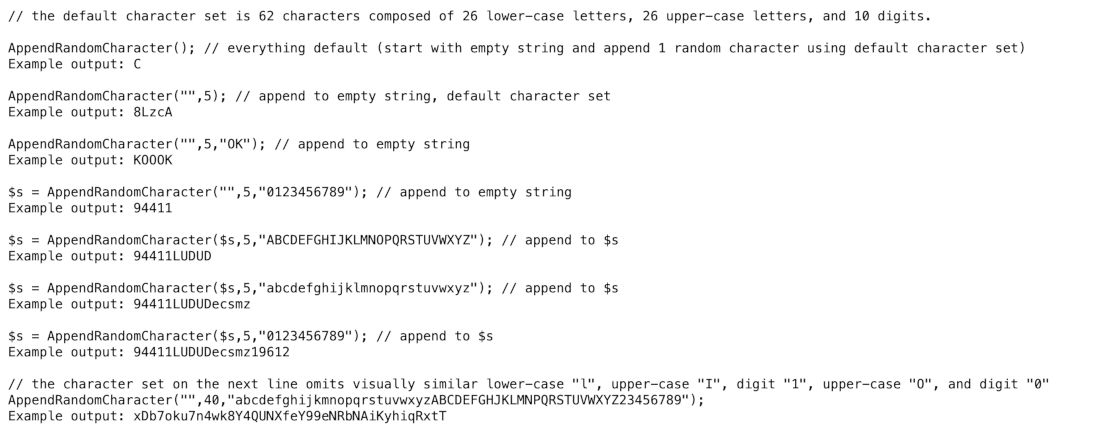
The demonstration script is designed so you can insert your own tests.
Here is the source code.
<?php
/*
AppendRandomCharacter() Function Demonstration
Version 1.0
April 8, 2025
Will Bontrager Software LLC
https://www.willmaster.com/
*/

echo '<pre>';
echo "// the default character set is 62 characters composed of 26 lower-case letters, 26 upper-case letters, and 10 digits.";
echo "\n\nAppendRandomCharacter(); // everything default (start with empty string and append 1 random character using default character set)\nExample output: " . AppendRandomCharacter();
echo "\n\nAppendRandomCharacter(\"\",5); // append to empty string, default character set\nExample output: " . AppendRandomCharacter("",5);
echo "\n\nAppendRandomCharacter(\"\",5,\"OK\"); // append to empty string\nExample output: " . AppendRandomCharacter("",5,"OK");
echo "\n\n\$s = AppendRandomCharacter(\"\",5,\"0123456789\"); // append to empty string\nExample output: " . $s = AppendRandomCharacter("",5,"0123456789");
echo "\n\n\$s = AppendRandomCharacter(\$s,5,\"ABCDEFGHIJKLMNOPQRSTUVWXYZ\"); // append to \$s\nExample output: " . $s = AppendRandomCharacter($s,5,"ABCDEFGHIJKLMNOPQRSTUVWXYZ");
echo "\n\n\$s = AppendRandomCharacter(\$s,5,\"abcdefghijklmnopqrstuvwxyz\"); // append to \$s\nExample output: " . $s = AppendRandomCharacter($s,5,"abcdefghijklmnopqrstuvwxyz");
echo "\n\n\$s = AppendRandomCharacter(\$s,5,\"0123456789\"); // append to \$s\nExample output: " . $s = AppendRandomCharacter($s,5,"0123456789");
echo "\n\n".'// the character set on the next line omits visually similar lower-case "l", upper-case "I", digit "1", upper-case "O", and digit "0"';
echo "\nAppendRandomCharacter(\"\",40,\"abcdefghijkmnopqrstuvwxyzABCDEFGHJKLMNPQRSTUVWXYZ23456789\");\nExample output: " . AppendRandomCharacter("",40,"abcdefghijkmnopqrstuvwxyzABCDEFGHJKLMNPQRSTUVWXYZ23456789");
echo '</pre>';

function AppendRandomCharacter($s='',$howmany=1,$chars='abcdefghijklmnopqrstuvwxyzABCDEFGHIJKLMNOPQRSTUVWXYZ0123456789')
{
   if(!strlen($chars)) { $chars='-'; }
   $endchar = strlen($chars)-1;
   for($i=0; $i<$howmany; $i++) { $s .= substr($chars,mt_rand(0,$endchar),1); }
   return $s;
} # function AppendRandomCharacter()
?>
Give the demonstration script any valid *.php file name. Upload it to at any public accessible location on your server. Then type its URL into your browser.
The AppendRandomCharacter() function is ultra-easy to implement. Pop the function into your PHP script and you're good to go
(This content first appeared in Possibilities newsletter.)
Will Bontrager







