



Amazon Hardcover and Paperback Book Cover Measurements
I publish a number of books. The Books at Bontrager Connection index page lists a dozen or so. In addition to ebooks, some of them are published as hardcover and paperback books.
To publish hardcover or paperback, assuming you create your own covers, a custom template can be generated at Amazon. They call it a calculator. Tap kdp.amazon.com/en_US/cover-calculator to use the calculator.
The image below is an example of what the calculator responds with. The calculator was used for a recent hardcover book I published.
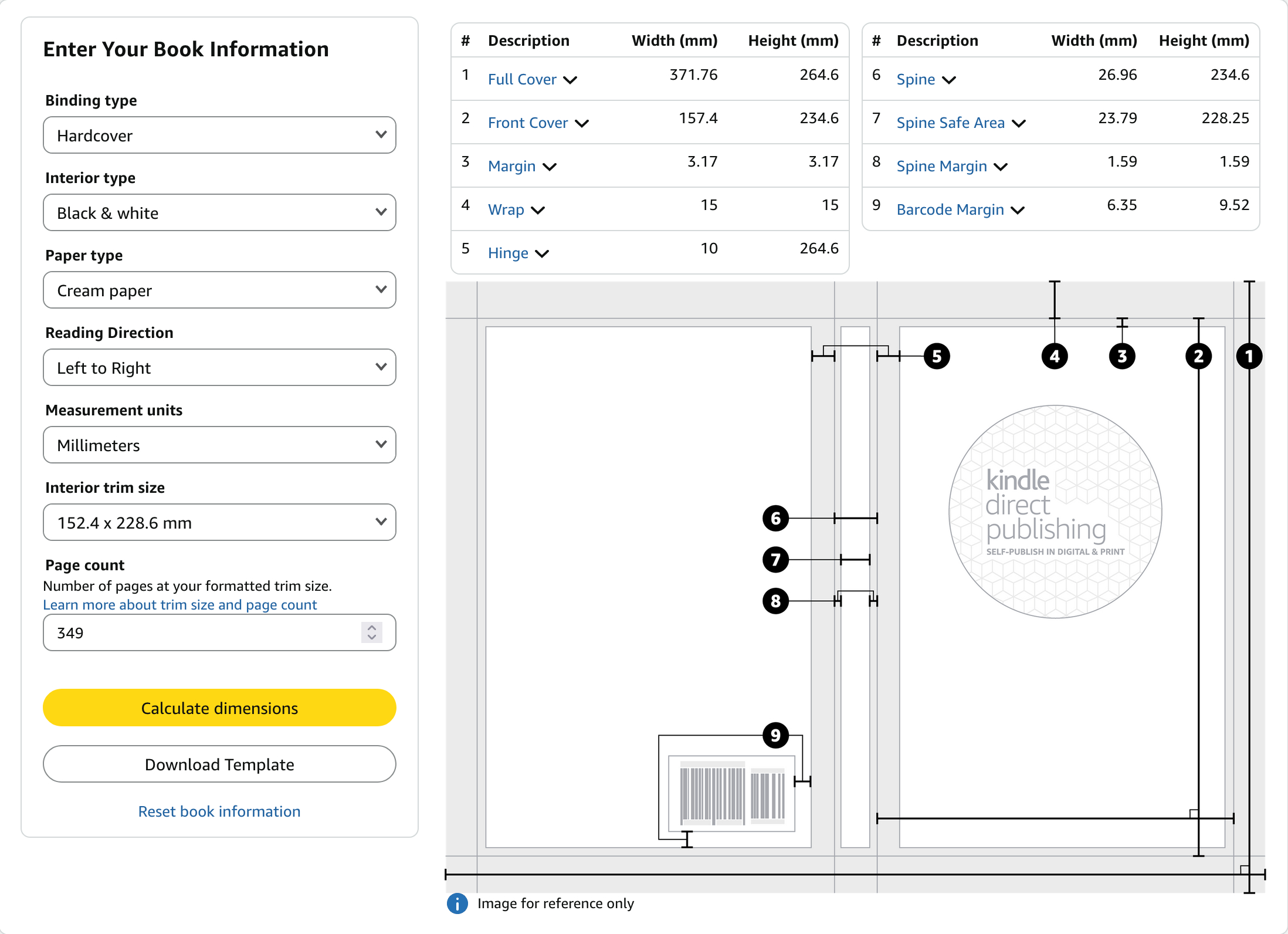
It used to be that every time I created a cover for publishing a paperback or hardcover book at Amazon, I had to do numerous calculations to figure out where to put various content on the cover image.
When the number of pages changes, the thickness of the book changes. When the thickness changes, the size of the wrap-around cover image also changes.
Here is the cover image of the hardcover book the above calculator screenshot was for. (One of my pen names is Vern Harrison.)
.png)
You see there are three panels with content. The left side of the image contains the panel for the back cover. The narrow, tall panel in the center is for the spine of the book. The panel at the right side of the image is for the front cover. (I almost always place the cover image under the panels.)
To find the specific locations for each panel is where I used to do manual calculations.
Now, I use my own software for calculating the position of the panels. I fire up the software and give it the numbers that the Amazon calculator gave to me.
This is a screenshot of the page where the Amazon calculator numbers are plugged in.
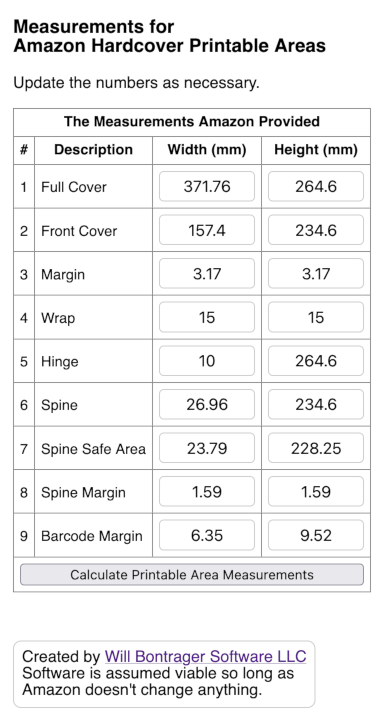
Then tap that "Calculate…" button. In less than a breath, I have the numbers I need.
Here is a screenshot with the result of using the above numbers.
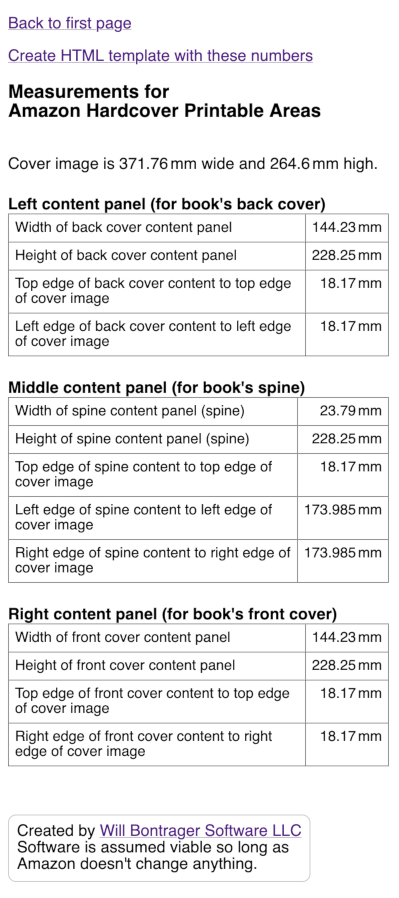
If you use image software to create covers, then the above may be all you need for sizing and positioning.
I use HTML and CSS to create covers. The "Create HTML template with these numbers" link you see near the top of the last screenshot is for me. And for you if you wish to use HTML and CSS.
When that link is used, you get a template something like this (the paperback template looks a bit different):
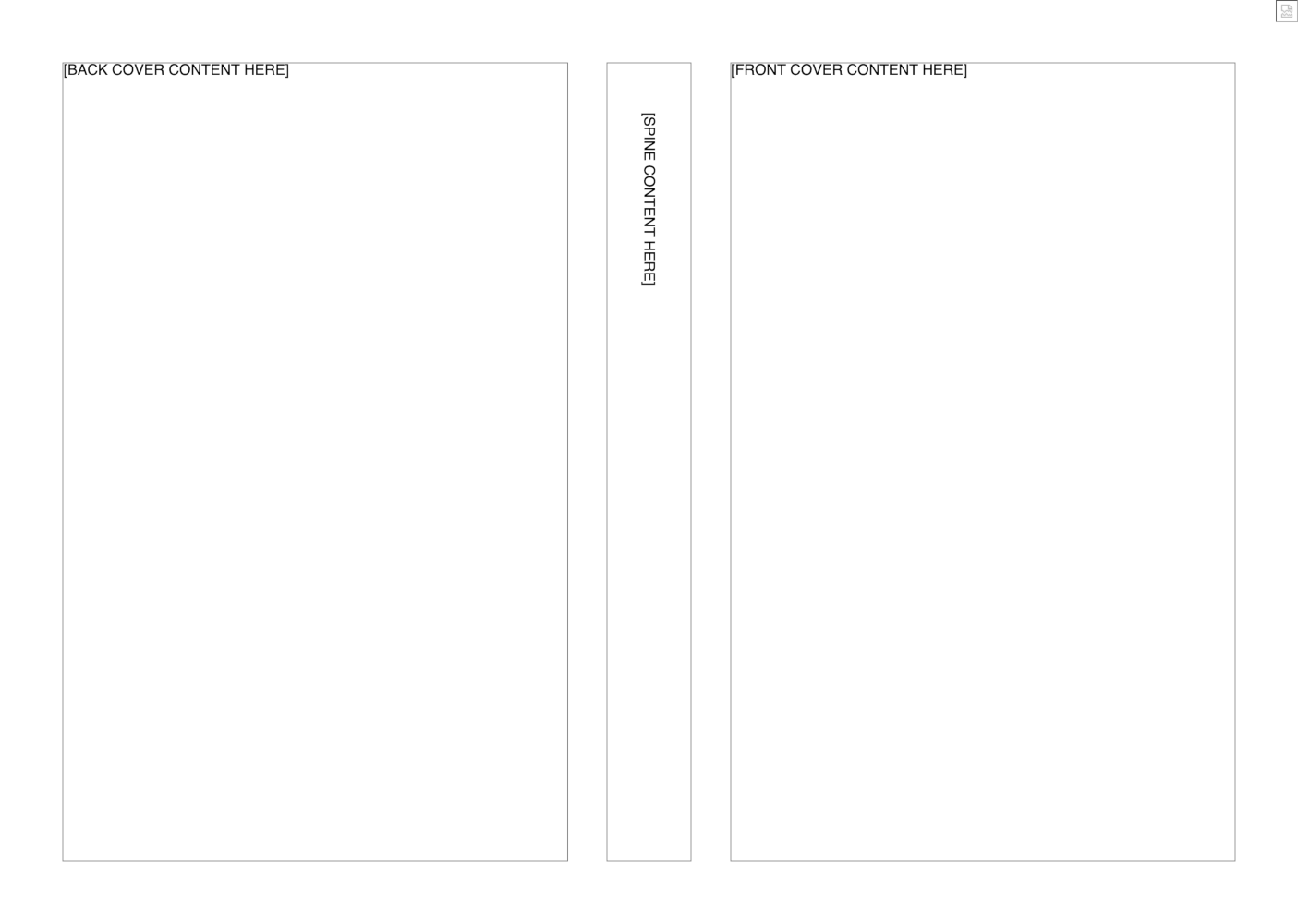
Save the template web page. Then use it to fill in your content. I find it simple. But then, I'm comfortable with HTML and CSS.
What I do is add an image to the template (the place is marked) and then add the content for each panel (also marked). When the result is what I want for the cover, I take a screenshot of it.
If you use Firefox, you may already have noticed the "Take Screenshot" menu item when right-clicking on most places of a web page. With Firefox, you have the option of screenshotting the entire page, even when not all of it is showing in the browser window. It's a really handy tool.
Amazon requires a ready-to-print PDF for printing hardcover and paperback book covers. With the screenshot at hand, you are now ready to create the PDF. Image-to-PDF instructions are outside the scope of this article. But you might use GIMP, Word, OpenOffice, or an online service to do the job (I generally use either GIMP or an online service).
The Source Code
There are two PHP scripts. One is for calculations related to hardcover book covers. The other is for calculations related to paperback books.
The scripts save the settings of the last time they were used. When the script loads, those settings are re-entered for you. You change what needs to be changed.
You may wish to change the file name where the settings are saved. It is an assignment to the $LastNumbersFileName variable on line 10 of the script. There are no other customizations.
Hardcover Books
This software may be used to determine content panel measurements for Amazon hardcover books.
<?php /*
Measurements for Amazon Hardcover Printable Areas
Version 1.0
April 30, 2026
Will Bontrager Software LLC
https://www.willmaster.com/
*/
// All book cover measurements in this software are millimeters.
$LastNumbersFileName = 'MAHPA.json';
$Prefill = array(); // Defaults copied from specs for black & white, cream paper, 152.4x228.6mm(6x9"), 349 pages.
$Prefill['fullcover']['w'] = 371.76;
$Prefill['fullcover']['h'] = 264.6;
$Prefill['frontcover']['w'] = 157.4;
$Prefill['frontcover']['h'] = 234.6;
$Prefill['margin']['w'] = 3.17;
$Prefill['margin']['h'] = 3.17;
$Prefill['wrap']['w'] = 15;
$Prefill['wrap']['h'] = 15;
$Prefill['hinge']['w'] = 10;
$Prefill['hinge']['h'] = 264.6;
$Prefill['spine']['w'] = 26.96;
$Prefill['spine']['h'] = 234.6;
$Prefill['spinesafearea']['w'] = 23.79;
$Prefill['spinesafearea']['h'] = 228.25;
$Prefill['spinemargin']['w'] = 1.59;
$Prefill['spinemargin']['h'] = 1.59;
$Prefill['barcodemargin']['w'] = 6.35;
$Prefill['barcodemargin']['h'] = 9.52;
$defaultPrefill = $Prefill;
if( isset($_GET['fullSizeWidth']) ) { PresentTemplate(); }
elseif( isset($_POST['fullcover_w']) ) { PresentMeasurements(); }
else { PresentForm(); }
function PresentTemplate()
{
$fullSizeWidth = $_GET['fullSizeWidth'];
$fullSizeHeight = $_GET['fullSizeHeight'];
$topContentToEdge = $_GET['topContentToEdge'];
$leftrightContentToEdge = $topContentToEdge;
$contentPanelHeight = $_GET['contentPanelHeight'];
$leftrightPanelWidth = $_GET['leftrightPanelWidth'];
$middlePanelWidth = $_GET['middlePanelWidth'];
$middleContentToEdge = $_GET['middleContentToEdge'];
echo <<<PAGE
<!DOCTYPE html>
<html lang="en">
<head>
<meta charset="utf-8">
<meta http-equiv="Content-Type" content="text/html;charset=UTF-8">
<meta name="viewport" content="width=device-width, initial-scale=1.0">
<title>Template for Amazon Paperback Printable Areas</title>
<style type="text/css">
@charset "utf-8";
* { box-sizing:border-box; }
html,body { font-family:sans-serif; font-size:100%; margin:0;
width:{$fullSizeWidth}mm; height:{$fullSizeHeight}mm; margin:0; color:black; background-color:black; }
</style>
</head>
<body><div style="overflow:hidden; width:{$fullSizeWidth}mm; height:{$fullSizeHeight}mm; background-color:white; position:relative;">
\r\n\r\n\r\n<!-- It is expected that you have sufficient HTML and CSS skills to create the cover you want with this rudamentary template. -->
\r\n\r\n\r\n<!-- Optional cover image (placed before content that will be on top of the image -->
<div style="position:absolute; right:0; top:0; width:____;">
<img src="my_image.jpg" style="width:100%;">
</div>
<!-- end of optional cover image -->
\r\n\r\n\r\n<!-- Left panel (for book's back cover) -->
<!-- IMPORTANT: Make outline color transparent (or remove) before publishing. -->
<div style="outline:1px solid gray; position:absolute; top:{$topContentToEdge}mm; left:{$leftrightContentToEdge}mm; width:{$leftrightPanelWidth}mm; height:{$contentPanelHeight}mm;">
[BACK COVER CONTENT HERE]
</div>
<!-- end of left panel (for book's back cover) -->
\r\n\r\n\r\n<!-- Center panel (for book's spine) -->
<!-- IMPORTANT: Make outline color transparent (or remove) before publishing. -->
<div style="outline:1px solid gray; position:absolute; top:{$topContentToEdge}mm; left:{$middleContentToEdge}mm; width:{$middlePanelWidth}mm; height:{$contentPanelHeight}mm;">
<div style="transform:rotate(90deg); white-space:nowrap; padding-left:{$middlePanelWidth}mm;">[SPINE CONTENT HERE]</div>
</div>
<!-- end of center panel (for book's spine) -->
\r\n\r\n\r\n<!-- Right panel (for book's front cover) -->
<!-- IMPORTANT: Make outline color transparent (or remove) before publishing. -->
<div style="outline:1px solid gray; position:absolute; top:{$topContentToEdge}mm; right:{$leftrightContentToEdge}mm; width:{$leftrightPanelWidth}mm; height:{$contentPanelHeight}mm;">
[FRONT COVER CONTENT HERE]
</div>
<!-- end of right Panel (for book's front cover) -->
\r\n\r\n</div>
</body>
</html>
PAGE;
} # PresentTemplate()
function PresentMeasurements()
{
global $LastNumbersFileName, $Prefill;
// Save the measurements for loading next time.
$Prefill['fullcover']['w'] = $_POST['fullcover_w'];
$Prefill['fullcover']['h'] = $_POST['fullcover_h'];
$Prefill['frontcover']['w'] = $_POST['frontcover_w'];
$Prefill['frontcover']['h'] = $_POST['frontcover_h'];
$Prefill['margin']['w'] = $_POST['margin_w'];
$Prefill['margin']['h'] = $_POST['margin_h'];
$Prefill['wrap']['w'] = $_POST['wrap_w'];
$Prefill['wrap']['h'] = $_POST['wrap_h'];
$Prefill['hinge']['w'] = $_POST['hinge_w'];
$Prefill['hinge']['h'] = $_POST['hinge_h'];
$Prefill['spine']['w'] = $_POST['spine_w'];
$Prefill['spine']['h'] = $_POST['spine_h'];
$Prefill['spinesafearea']['w'] = $_POST['spinesafearea_w'];
$Prefill['spinesafearea']['h'] = $_POST['spinesafearea_h'];
$Prefill['spinemargin']['w'] = $_POST['spinemargin_w'];
$Prefill['spinemargin']['h'] = $_POST['spinemargin_h'];
$Prefill['barcodemargin']['w'] = $_POST['barcodemargin_w'];
$Prefill['barcodemargin']['h'] = $_POST['barcodemargin_h'];
file_put_contents(__DIR__."/$LastNumbersFileName",json_encode($Prefill));
// Do the calculations.
$fullSizeWidth = $Prefill['fullcover']['w'];
$fullSizeHeight = $Prefill['fullcover']['h'];
$topContentToEdge = $Prefill['wrap']['h'] + $Prefill['margin']['h'];
$leftrightContentToEdge = $topContentToEdge;
$contentPanelHeight = $Prefill['spinesafearea']['h'];
$leftrightPanelWidth = $Prefill['frontcover']['w'] - $Prefill['hinge']['w'] - $Prefill['margin']['w'];
$middlePanelWidth = $Prefill['spinesafearea']['w'];
$f = $Prefill['fullcover']['w']-$Prefill['spinesafearea']['w'];
$middleContentToEdge = $f/2;
$Prefill['calc']['LeftPanelWidth'] = $leftrightPanelWidth;
$Prefill['calc']['LeftPanelHeight'] = $contentPanelHeight;
$Prefill['calc']['LeftPanelTopToEdge'] = $topContentToEdge;
$Prefill['calc']['LeftPanelLeftToEdge'] = $leftrightContentToEdge;
$Prefill['calc']['MiddlePanelWidth'] = $middlePanelWidth;
$Prefill['calc']['MiddlePanelHeight'] = $contentPanelHeight;
$Prefill['calc']['MiddlePanelTopToEdge'] = $topContentToEdge;
$Prefill['calc']['MiddlePanelLeftToEdge'] = $middleContentToEdge;
$Prefill['calc']['MiddlePanelRightToEdge'] = $middleContentToEdge;
$Prefill['calc']['RightPanelWidth'] = $leftrightPanelWidth;
$Prefill['calc']['RightPanelHeight'] = $contentPanelHeight;
$Prefill['calc']['RightPanelTopToEdge'] = $topContentToEdge;
$Prefill['calc']['RightPanelRightToEdge'] = $leftrightContentToEdge;
// Present the numbers.
echo <<<PAGETOP
<!DOCTYPE html>
<html lang="en">
<head>
<meta http-equiv="Content-Type" content="text/html;charset=UTF-8">
<meta name="viewport" content="width=device-width, initial-scale=1.0">
<title>Measurements for Amazon Hardcover Printable Areas</title>
<style type="text/css">
@charset "utf-8";
* { box-sizing:border-box; }
body { font-family:sans-serif; font-size:100%; }
tr { font-size:90%; font-weight:bold; vertical-align:bottom; }
td { font-size:100%; font-weight:normal; vertical-align:center; }
input[type="text"] { width:6em; font-size:1rem; border:1px solid #ccc; padding:.3rem; border-radius:.3rem; text-align:center; }
</style>
</head>
<body>
<p><a href="{$_SERVER['PHP_SELF']}">Back to first page</a></p>
<p><a href="{$_SERVER['PHP_SELF']}?fullSizeWidth=$fullSizeWidth&fullSizeHeight=$fullSizeHeight&topContentToEdge=$topContentToEdge&leftrightContentToEdge=$leftrightContentToEdge&contentPanelHeight=$contentPanelHeight&leftrightPanelWidth=$leftrightPanelWidth&middlePanelWidth=$middlePanelWidth&middleContentToEdge=$middleContentToEdge">Create HTML template with these numbers</a></p>
<h3>Measurements for<br>Amazon Hardcover Printable Areas</h3>
<p style="position:relative; bottom:-1em;">
Cover image is {$Prefill['fullcover']['w']} mm wide and {$Prefill['fullcover']['h']} mm high.
</p>
<div style="display:inline-block; margin-right:2rem; margin-top:1.5rem; vertical-align:top;">
<div><b>Left content panel (for book's back cover)</b></div>
<table border="1" cellspacing="0" cellpadding="6" style="border-collapse:collapse; empty-cells:show;">
<tr><td>Width of back cover content panel</td><td style="text-align:right; white-space:nowrap;">{$Prefill['calc']['LeftPanelWidth']} mm</td></tr>
<tr><td>Height of back cover content panel</td><td style="text-align:right; white-space:nowrap;">{$Prefill['calc']['LeftPanelHeight']} mm</td></tr>
<tr><td>Top edge of back cover content to top edge of cover image</td><td style="text-align:right; white-space:nowrap;">{$Prefill['calc']['LeftPanelTopToEdge']} mm</td></tr>
<tr><td>Left edge of back cover content to left edge of cover image</td><td style="text-align:right; white-space:nowrap;">{$Prefill['calc']['LeftPanelLeftToEdge']} mm</td></tr>
</table>
</div>
<div style="display:inline-block; margin-right:2rem; margin-top:1.5rem; vertical-align:top;">
<div><b>Middle content panel (for book's spine)</b></div>
<table border="1" cellspacing="0" cellpadding="6" style="border-collapse:collapse; empty-cells:show;">
<tr><td>Width of spine content panel (spine)</td><td style="text-align:right; white-space:nowrap;">{$Prefill['calc']['MiddlePanelWidth']} mm</td></tr>
<tr><td>Height of spine content panel (spine)</td><td style="text-align:right; white-space:nowrap;">{$Prefill['calc']['MiddlePanelHeight']} mm</td></tr>
<tr><td>Top edge of spine content to top edge of cover image</td><td style="text-align:right; white-space:nowrap;">{$Prefill['calc']['LeftPanelTopToEdge']} mm</td></tr>
<tr><td>Left edge of spine content to left edge of cover image</td><td style="text-align:right; white-space:nowrap;">{$Prefill['calc']['MiddlePanelLeftToEdge']} mm</td></tr>
<tr><td>Right edge of spine content to right edge of cover image</td><td style="text-align:right; white-space:nowrap;">{$Prefill['calc']['MiddlePanelRightToEdge']} mm</td></tr>
</table>
</div>
<div style="display:inline-block; margin-right:2rem; margin-top:1.5rem; vertical-align:top;">
<div><b>Right content panel (for book's front cover)</b></div>
<table border="1" cellspacing="0" cellpadding="6" style="border-collapse:collapse; empty-cells:show;">
<tr><td>Width of front cover content panel</td><td style="text-align:right; white-space:nowrap;">{$Prefill['calc']['RightPanelWidth']} mm</td></tr>
<tr><td>Height of front cover content panel</td><td style="text-align:right; white-space:nowrap;">{$Prefill['calc']['RightPanelHeight']} mm</td></tr>
<tr><td>Top edge of front cover content to top edge of cover image</td><td style="text-align:right; white-space:nowrap;">{$Prefill['calc']['RightPanelTopToEdge']} mm</td></tr>
<tr><td>Right edge of front cover content to right edge of cover image</td><td style="text-align:right; white-space:nowrap;">{$Prefill['calc']['RightPanelRightToEdge']} mm</td></tr>
</table>
</div>
PAGETOP;
PresentPageBottom();
} # function PresentMeasurements()
function PresentForm()
{
global $LastNumbersFileName, $Prefill;
if( file_exists(__DIR__."/$LastNumbersFileName") ) { $Prefill = json_decode(trim(file_get_contents(__DIR__."/$LastNumbersFileName")),true); }
echo <<<PAGETOP
<!DOCTYPE html>
<html lang="en">
<head>
<meta http-equiv="Content-Type" content="text/html;charset=UTF-8">
<meta name="viewport" content="width=device-width, initial-scale=1.0">
<title>Measurements for Amazon Hardcover Printable Areas</title>
<style type="text/css">
@charset "utf-8";
* { box-sizing:border-box; }
body { font-family:sans-serif; font-size:100%; }
tr { font-size:90%; font-weight:bold; vertical-align:bottom; }
td { font-size:100%; font-weight:normal; vertical-align:center; }
input[type="text"] { width:6em; font-size:1rem; border:1px solid #ccc; padding:.3rem; border-radius:.3rem; text-align:center; }
</style>
</head>
<body>
<form id="my-form" enctype="multipart/form-data" action="{$_SERVER['PHP_SELF']}" method="post" accept-charset="utf-8">
<div style="width:fit-content; margin:0 auto;">
<h3>Measurements for<br>Amazon Hardcover Printable Areas</h3>
<p>Update the numbers as necessary.</p>
<table border="1" cellspacing="0" cellpadding="6" style="border-collapse:collapse; empty-cells:show;">
<tr>
<th colspan="4">The Measurements Amazon Provided</th>
</tr>
<tr>
<th>#</th><th>Description</th><th>Width (mm)</th><th>Height (mm)</th>
</tr>
<tr>
<td>1</td>
<td>Full Cover</td>
<td><input name="fullcover_w" type="text" onfocus="select()" value="{$Prefill['fullcover']['w']}"></td>
<td><input name="fullcover_h" type="text" onfocus="select()" value="{$Prefill['fullcover']['h']}"></td>
</tr>
<tr>
<td>2</td>
<td>Front Cover</td>
<td><input name="frontcover_w" type="text" onfocus="select()" value="{$Prefill['frontcover']['w']}"></td>
<td><input name="frontcover_h" type="text" onfocus="select()" value="{$Prefill['frontcover']['h']}"></td>
</tr>
<tr>
<td>3</td>
<td>Margin</td>
<td><input name="margin_w" type="text" onfocus="select()" value="{$Prefill['margin']['w']}"></td>
<td><input name="margin_h" type="text" onfocus="select()" value="{$Prefill['margin']['h']}"></td>
</tr>
<tr>
<td>4</td>
<td>Wrap</td>
<td><input name="wrap_w" type="text" onfocus="select()" value="{$Prefill['wrap']['w']}"></td>
<td><input name="wrap_h" type="text" onfocus="select()" value="{$Prefill['wrap']['h']}"></td>
</tr>
<tr>
<td>5</td>
<td>Hinge</td>
<td><input name="hinge_w" type="text" onfocus="select()" value="{$Prefill['hinge']['w']}"></td>
<td><input name="hinge_h" type="text" onfocus="select()" value="{$Prefill['hinge']['h']}"></td>
</tr>
<tr>
<td>6</td>
<td>Spine</td>
<td><input name="spine_w" type="text" onfocus="select()" value="{$Prefill['spine']['w']}"></td>
<td><input name="spine_h" type="text" onfocus="select()" value="{$Prefill['spine']['h']}"></td>
</tr>
<tr>
<td>7</td>
<td>Spine Safe Area</td>
<td><input name="spinesafearea_w" type="text" onfocus="select()" value="{$Prefill['spinesafearea']['w']}"></td>
<td><input name="spinesafearea_h" type="text" onfocus="select()" value="{$Prefill['spinesafearea']['h']}"></td>
</tr>
<tr>
<td>8</td>
<td>Spine Margin</td>
<td><input name="spinemargin_w" type="text" onfocus="select()" value="{$Prefill['spinemargin']['w']}"></td>
<td><input name="spinemargin_h" type="text" onfocus="select()" value="{$Prefill['spinemargin']['h']}"></td>
</tr>
<tr>
<td>9</td>
<td>Barcode Margin</td>
<td><input name="barcodemargin_w" type="text" onfocus="select()" value="{$Prefill['barcodemargin']['w']}"></td>
<td><input name="barcodemargin_h" type="text" onfocus="select()" value="{$Prefill['barcodemargin']['h']}"></td>
</tr>
<tr>
<td colspan="4"><input type="submit" value="Calculate Printable Area Measurements" style="width:100%;"></td>
</tr>
</table>
PAGETOP;
PresentPageBottom();
} # function PresentForm()
function PresentPageBottom()
{
echo <<<PAGEBOTTOM
<p style="margin-top:3em; border:1px solid #ccc; padding:.5em; border-radius:.5em; width:fit-content;">
Created by <a href="">Will Bontrager Software LLC</a>
<br>Software is assumed viable so long as <br>Amazon doesn't change anything.
</p>
</div>
</body>
</html>
PAGEBOTTOM;
} # function PresentForm()
exit;
?>
Paperback Books
This software may be used to determine content panel measurements for Amazon paperback books.
<?php /*
Measurements for Amazon Paperback Printable Areas
Version 1.0
April 30, 2026
Will Bontrager Software LLC
https://www.willmaster.com/
*/
// All book cover measurements in this software are millimeters.
$LastNumbersFileName = 'MAPPA.json';
$Prefill = array(); // Defaults copied from specs for black & white, cream paper, 152.4x228.6mm(6x9"), 315 pages.
$Prefill['fullcover']['w'] = 331.15;
$Prefill['fullcover']['h'] = 234.95;
$Prefill['frontcover']['w'] = 152.4;
$Prefill['frontcover']['h'] = 228.6;
$Prefill['safearea']['w'] = 149.23;
$Prefill['safearea']['h'] = 222.25;
$Prefill['bleed']['w'] = 3.17;
$Prefill['bleed']['h'] = 3.17;
$Prefill['margin']['w'] = 3.17;
$Prefill['margin']['h'] = 3.17;
$Prefill['spine']['w'] = 20;
$Prefill['spine']['h'] = 228.6;
$Prefill['spinesafearea']['w'] = 16.83;
$Prefill['spinesafearea']['h'] = 222.25;
$Prefill['spinemargin']['w'] = 1.59;
$Prefill['spinemargin']['h'] = 1.59;
$Prefill['barcodemargin']['w'] = 6.35;
$Prefill['barcodemargin']['h'] = 6.35;
$defaultPrefill = $Prefill;
if( isset($_GET['fullSizeWidth']) ) { PresentTemplate(); }
elseif( isset($_POST['fullcover_w']) ) { PresentMeasurements(); }
else { PresentForm(); }
function PresentTemplate()
{
$fullSizeWidth = $_GET['fullSizeWidth'];
$fullSizeHeight = $_GET['fullSizeHeight'];
$topContentToEdge = $_GET['topContentToEdge'];
$leftrightContentToEdge = $topContentToEdge;
$contentPanelHeight = $_GET['contentPanelHeight'];
$leftrightPanelWidth = $_GET['leftrightPanelWidth'];
$middlePanelWidth = $_GET['middlePanelWidth'];
$middleContentToEdge = $_GET['middleContentToEdge'];
echo <<<PAGE
<!DOCTYPE html>
<html lang="en">
<head>
<meta charset="utf-8">
<meta http-equiv="Content-Type" content="text/html;charset=UTF-8">
<meta name="viewport" content="width=device-width, initial-scale=1.0">
<title>Template for Amazon Paperback Printable Areas</title>
<style type="text/css">
@charset "utf-8";
* { box-sizing:border-box; }
html,body { font-family:sans-serif; font-size:100%; margin:0;
width:{$fullSizeWidth}mm; height:{$fullSizeHeight}mm; margin:0; color:black; background-color:black; }
</style>
</head>
<body><div style="overflow:hidden; width:{$fullSizeWidth}mm; height:{$fullSizeHeight}mm; background-color:white; position:relative;">
\r\n\r\n\r\n<!-- It is expected that you have sufficient HTML and CSS skills to create the cover you want with this rudamentary template. -->
\r\n\r\n\r\n<!-- Optional cover image (placed before content that will be on top of the image -->
<div style="position:absolute; right:0; top:0; width:____;">
<img src="my_image.jpg" style="width:100%;">
</div>
<!-- end of optional cover image -->
\r\n\r\n\r\n<!-- Left panel (for book's back cover) -->
<!-- IMPORTANT: Make outline color transparent (or remove) before publishing. -->
<div style="outline:1px solid gray; position:absolute; top:{$topContentToEdge}mm; left:{$leftrightContentToEdge}mm; width:{$leftrightPanelWidth}mm; height:{$contentPanelHeight}mm;">
[BACK COVER CONTENT HERE]
</div>
<!-- end of left panel (for book's back cover) -->
\r\n\r\n\r\n<!-- Center panel (for book's spine) -->
<!-- IMPORTANT: Make outline color transparent (or remove) before publishing. -->
<div style="outline:1px solid gray; position:absolute; top:{$topContentToEdge}mm; left:{$middleContentToEdge}mm; width:{$middlePanelWidth}mm; height:{$contentPanelHeight}mm;">
<div style="transform:rotate(90deg); white-space:nowrap; padding-left:{$middlePanelWidth}mm;">[SPINE CONTENT HERE]</div>
</div>
<!-- end of center panel (for book's spine) -->
\r\n\r\n\r\n<!-- Right panel (for book's front cover) -->
<!-- IMPORTANT: Make outline color transparent (or remove) before publishing. -->
<div style="outline:1px solid gray; position:absolute; top:{$topContentToEdge}mm; right:{$leftrightContentToEdge}mm; width:{$leftrightPanelWidth}mm; height:{$contentPanelHeight}mm;">
[FRONT COVER CONTENT HERE]
</div>
<!-- end of right Panel (for book's front cover) -->
\r\n\r\n</div>
</body>
</html>
PAGE;
} # PresentTemplate()
function PresentMeasurements()
{
global $LastNumbersFileName, $Prefill;
// Save the measurements for loading next time.
$Prefill['fullcover']['w'] = $_POST['fullcover_w'];
$Prefill['fullcover']['h'] = $_POST['fullcover_h'];
$Prefill['frontcover']['w'] = $_POST['frontcover_w'];
$Prefill['frontcover']['h'] = $_POST['frontcover_h'];
$Prefill['safearea']['w'] = $_POST['safearea_w'];
$Prefill['safearea']['h'] = $_POST['safearea_h'];
$Prefill['bleed']['w'] = $_POST['bleed_w'];
$Prefill['bleed']['h'] = $_POST['bleed_h'];
$Prefill['margin']['w'] = $_POST['margin_w'];
$Prefill['margin']['h'] = $_POST['margin_h'];
$Prefill['spine']['w'] = $_POST['spine_w'];
$Prefill['spine']['h'] = $_POST['spine_h'];
$Prefill['spinesafearea']['w'] = $_POST['spinesafearea_w'];
$Prefill['spinesafearea']['h'] = $_POST['spinesafearea_h'];
$Prefill['spinemargin']['w'] = $_POST['spinemargin_w'];
$Prefill['spinemargin']['h'] = $_POST['spinemargin_h'];
$Prefill['barcodemargin']['w'] = $_POST['barcodemargin_w'];
$Prefill['barcodemargin']['h'] = $_POST['barcodemargin_h'];
file_put_contents(__DIR__."/$LastNumbersFileName",json_encode($Prefill));
// Do the calculations.
$fullSizeWidth = $Prefill['fullcover']['w'];
$fullSizeHeight = $Prefill['fullcover']['h'];
$topContentToEdge = $Prefill['bleed']['h'] + $Prefill['margin']['h'];
$leftrightContentToEdge = $topContentToEdge;
$contentPanelHeight = $Prefill['safearea']['h'];
$leftrightPanelWidth = $Prefill['safearea']['w'];
$middlePanelWidth = $Prefill['spinesafearea']['w'];
$f = $Prefill['fullcover']['w']-$Prefill['spinesafearea']['w'];
$middleContentToEdge = $f/2;
$Prefill['calc']['LeftPanelWidth'] = $leftrightPanelWidth;
$Prefill['calc']['LeftPanelHeight'] = $contentPanelHeight;
$Prefill['calc']['LeftPanelTopToEdge'] = $topContentToEdge;
$Prefill['calc']['LeftPanelLeftToEdge'] = $leftrightContentToEdge;
$Prefill['calc']['MiddlePanelWidth'] = $middlePanelWidth;
$Prefill['calc']['MiddlePanelHeight'] = $contentPanelHeight;
$Prefill['calc']['MiddlePanelTopToEdge'] = $topContentToEdge;
$Prefill['calc']['MiddlePanelLeftToEdge'] = $middleContentToEdge;
$Prefill['calc']['MiddlePanelRightToEdge'] = $middleContentToEdge;
$Prefill['calc']['RightPanelWidth'] = $leftrightPanelWidth;
$Prefill['calc']['RightPanelHeight'] = $contentPanelHeight;
$Prefill['calc']['RightPanelTopToEdge'] = $topContentToEdge;
$Prefill['calc']['RightPanelRightToEdge'] = $leftrightContentToEdge;
// Present the numbers.
echo <<<PAGETOP
<!DOCTYPE html>
<html lang="en">
<head>
<meta http-equiv="Content-Type" content="text/html;charset=UTF-8">
<meta name="viewport" content="width=device-width, initial-scale=1.0">
<title>Measurements for Amazon Paperback Printable Areas</title>
<style type="text/css">
@charset "utf-8";
* { box-sizing:border-box; }
body { font-family:sans-serif; font-size:100%; }
tr { font-size:90%; font-weight:bold; vertical-align:bottom; }
td { font-size:100%; font-weight:normal; vertical-align:center; }
input[type="text"] { width:6em; font-size:1rem; border:1px solid #ccc; padding:.3rem; border-radius:.3rem; text-align:center; }
</style>
</head>
<body>
<p><a href="{$_SERVER['PHP_SELF']}">Back to first page</a></p>
<p><a href="{$_SERVER['PHP_SELF']}?fullSizeWidth=$fullSizeWidth&fullSizeHeight=$fullSizeHeight&topContentToEdge=$topContentToEdge&leftrightContentToEdge=$leftrightContentToEdge&contentPanelHeight=$contentPanelHeight&leftrightPanelWidth=$leftrightPanelWidth&middlePanelWidth=$middlePanelWidth&middleContentToEdge=$middleContentToEdge">Create HTML template with these numbers</a></p>
<h3>Measurements for<br>Amazon Paperback Printable Areas</h3>
<p style="position:relative; bottom:-1em;">
Cover image is {$Prefill['fullcover']['w']} mm wide and {$Prefill['fullcover']['h']} mm high.
</p>
<div style="display:inline-block; margin-right:2rem; margin-top:1.5rem; vertical-align:top;">
<div><b>Left content panel (for book's back cover)</b></div>
<table border="1" cellspacing="0" cellpadding="6" style="border-collapse:collapse; empty-cells:show;">
<tr><td>Width of back cover content panel</td><td style="text-align:right; white-space:nowrap;">{$Prefill['calc']['LeftPanelWidth']} mm</td></tr>
<tr><td>Height of back cover content panel</td><td style="text-align:right; white-space:nowrap;">{$Prefill['calc']['LeftPanelHeight']} mm</td></tr>
<tr><td>Top edge of back cover content to top edge of cover image</td><td style="text-align:right; white-space:nowrap;">{$Prefill['calc']['LeftPanelTopToEdge']} mm</td></tr>
<tr><td>Left edge of back cover content to left edge of cover image</td><td style="text-align:right; white-space:nowrap;">{$Prefill['calc']['LeftPanelLeftToEdge']} mm</td></tr>
</table>
</div>
<div style="display:inline-block; margin-right:2rem; margin-top:1.5rem; vertical-align:top;">
<div><b>Middle content panel (for book's spine)</b></div>
<table border="1" cellspacing="0" cellpadding="6" style="border-collapse:collapse; empty-cells:show;">
<tr><td>Width of spine content panel (spine)</td><td style="text-align:right; white-space:nowrap;">{$Prefill['calc']['MiddlePanelWidth']} mm</td></tr>
<tr><td>Height of spine content panel (spine)</td><td style="text-align:right; white-space:nowrap;">{$Prefill['calc']['MiddlePanelHeight']} mm</td></tr>
<tr><td>Top edge of spine content to top edge of cover image</td><td style="text-align:right; white-space:nowrap;">{$Prefill['calc']['LeftPanelTopToEdge']} mm</td></tr>
<tr><td>Left edge of spine content to left edge of cover image</td><td style="text-align:right; white-space:nowrap;">{$Prefill['calc']['MiddlePanelLeftToEdge']} mm</td></tr>
<tr><td>Right edge of spine content to right edge of cover image</td><td style="text-align:right; white-space:nowrap;">{$Prefill['calc']['MiddlePanelRightToEdge']} mm</td></tr>
</table>
</div>
<div style="display:inline-block; margin-right:2rem; margin-top:1.5rem; vertical-align:top;">
<div><b>Right content panel (for book's front cover)</b></div>
<table border="1" cellspacing="0" cellpadding="6" style="border-collapse:collapse; empty-cells:show;">
<tr><td>Width of front cover content panel</td><td style="text-align:right; white-space:nowrap;">{$Prefill['calc']['RightPanelWidth']} mm</td></tr>
<tr><td>Height of front cover content panel</td><td style="text-align:right; white-space:nowrap;">{$Prefill['calc']['RightPanelHeight']} mm</td></tr>
<tr><td>Top edge of front cover content to top edge of cover image</td><td style="text-align:right; white-space:nowrap;">{$Prefill['calc']['RightPanelTopToEdge']} mm</td></tr>
<tr><td>Right edge of front cover content to right edge of cover image</td><td style="text-align:right; white-space:nowrap;">{$Prefill['calc']['RightPanelRightToEdge']} mm</td></tr>
</table>
</div>
PAGETOP;
PresentPageBottom();
} # function PresentMeasurements()
function PresentForm()
{
global $LastNumbersFileName, $Prefill;
if( file_exists(__DIR__."/$LastNumbersFileName") ) { $Prefill = json_decode(trim(file_get_contents(__DIR__."/$LastNumbersFileName")),true); }
echo <<<PAGETOP
<!DOCTYPE html>
<html lang="en">
<head>
<meta http-equiv="Content-Type" content="text/html;charset=UTF-8">
<meta name="viewport" content="width=device-width, initial-scale=1.0">
<title>Measurements for Amazon Paperback Printable Areas</title>
<style type="text/css">
@charset "utf-8";
* { box-sizing:border-box; }
body { font-family:sans-serif; font-size:100%; }
tr { font-size:90%; font-weight:bold; vertical-align:bottom; }
td { font-size:100%; font-weight:normal; vertical-align:center; }
input[type="text"] { width:6em; font-size:1rem; border:1px solid #ccc; padding:.3rem; border-radius:.3rem; text-align:center; }
</style>
</head>
<body>
<form id="my-form" enctype="multipart/form-data" action="{$_SERVER['PHP_SELF']}" method="post" accept-charset="utf-8">
<div style="width:fit-content; margin:0 auto;">
<h3>Measurements for<br>Amazon Paperback Printable Areas</h3>
<p>Update the numbers as necessary.</p>
<table border="1" cellspacing="0" cellpadding="6" style="border-collapse:collapse; empty-cells:show;">
<tr>
<th colspan="4">The Measurements Amazon Provided</th>
</tr>
<tr>
<th>#</th><th>Description</th><th>Width (mm)</th><th>Height (mm)</th>
</tr>
<tr>
<td>1</td>
<td>Full Cover</td>
<td><input name="fullcover_w" type="text" onfocus="select()" value="{$Prefill['fullcover']['w']}"></td>
<td><input name="fullcover_h" type="text" onfocus="select()" value="{$Prefill['fullcover']['h']}"></td>
</tr>
<tr>
<td>2</td>
<td>Front Cover</td>
<td><input name="frontcover_w" type="text" onfocus="select()" value="{$Prefill['frontcover']['w']}"></td>
<td><input name="frontcover_h" type="text" onfocus="select()" value="{$Prefill['frontcover']['h']}"></td>
</tr>
<tr>
<td>3</td>
<td>Safe Area</td>
<td><input name="safearea_w" type="text" onfocus="select()" value="{$Prefill['safearea']['w']}"></td>
<td><input name="safearea_h" type="text" onfocus="select()" value="{$Prefill['safearea']['h']}"></td>
</tr>
<tr>
<td>4</td>
<td>Bleed</td>
<td><input name="bleed_w" type="text" onfocus="select()" value="{$Prefill['bleed']['w']}"></td>
<td><input name="bleed_h" type="text" onfocus="select()" value="{$Prefill['bleed']['h']}"></td>
</tr>
<tr>
<td>5</td>
<td>Margin</td>
<td><input name="margin_w" type="text" onfocus="select()" value="{$Prefill['margin']['w']}"></td>
<td><input name="margin_h" type="text" onfocus="select()" value="{$Prefill['margin']['h']}"></td>
</tr>
<tr>
<td>6</td>
<td>Spine</td>
<td><input name="spine_w" type="text" onfocus="select()" value="{$Prefill['spine']['w']}"></td>
<td><input name="spine_h" type="text" onfocus="select()" value="{$Prefill['spine']['h']}"></td>
</tr>
<tr>
<td>7</td>
<td>Spine Safe Area</td>
<td><input name="spinesafearea_w" type="text" onfocus="select()" value="{$Prefill['spinesafearea']['w']}"></td>
<td><input name="spinesafearea_h" type="text" onfocus="select()" value="{$Prefill['spinesafearea']['h']}"></td>
</tr>
<tr>
<td>8</td>
<td>Spine Margin</td>
<td><input name="spinemargin_w" type="text" onfocus="select()" value="{$Prefill['spinemargin']['w']}"></td>
<td><input name="spinemargin_h" type="text" onfocus="select()" value="{$Prefill['spinemargin']['h']}"></td>
</tr>
<tr>
<td>9</td>
<td>Barcode Margin</td>
<td><input name="barcodemargin_w" type="text" onfocus="select()" value="{$Prefill['barcodemargin']['w']}"></td>
<td><input name="barcodemargin_h" type="text" onfocus="select()" value="{$Prefill['barcodemargin']['h']}"></td>
</tr>
<tr>
<td colspan="4"><input type="submit" value="Calculate Printable Area Measurements" style="width:100%;"></td>
</tr>
</table>
PAGETOP;
PresentPageBottom();
} # function PresentForm()
function PresentPageBottom()
{
echo <<<PAGEBOTTOM
<p style="margin-top:3em; border:1px solid #ccc; padding:.5em; border-radius:.5em; width:fit-content;">
Created by <a href="">Will Bontrager Software LLC</a>
<br>Software is assumed viable so long as <br>Amazon doesn't change anything.
</p>
</div>
</body>
</html>
PAGEBOTTOM;
} # function PresentForm()
exit;
?>
If you publish at Amazon, you may find the measurement calculators a nice tool. The measurement numbers may be consulted for use with pretty much any image software.
If you also use HTML and CSS to create your book covers, the HTML template feature is likely to be helpful.
(This content first appeared in Possibilities newsletter.)
Will Bontrager







